







Accounts payable often seems straightforward on paper—receive an invoice, secure approval, issue payment, and log the transaction. Yet scale this process to hundreds of vendors, layer in multi-step approval workflows, and reconcile finances across multiple business entities, and finance teams quickly become overwhelmed by physical paperwork, endless email chains, and messy spreadsheets. This is the core challenge Bill.com has aimed to address for nearly 20 years, and after six months of using the platform to handle AP and AR for a 45-person company, it’s clear the solution delivers on its core promise.
That said, Bill.com comes with notable drawbacks: it is neither affordable nor overly intuitive. The Essentials plan starts at $45 per user each month, excluding transaction fees, leading to rapidly rising costs for larger teams, and its actual learning curve is steeper than advertised. While international payments are supported, their associated fees make specialized cross-border payment tools a better choice for businesses with heavy global activity. Additionally, premium features such as Divvy corporate card integration demand independent setup and internal approval processes.
What Is Bill.com?
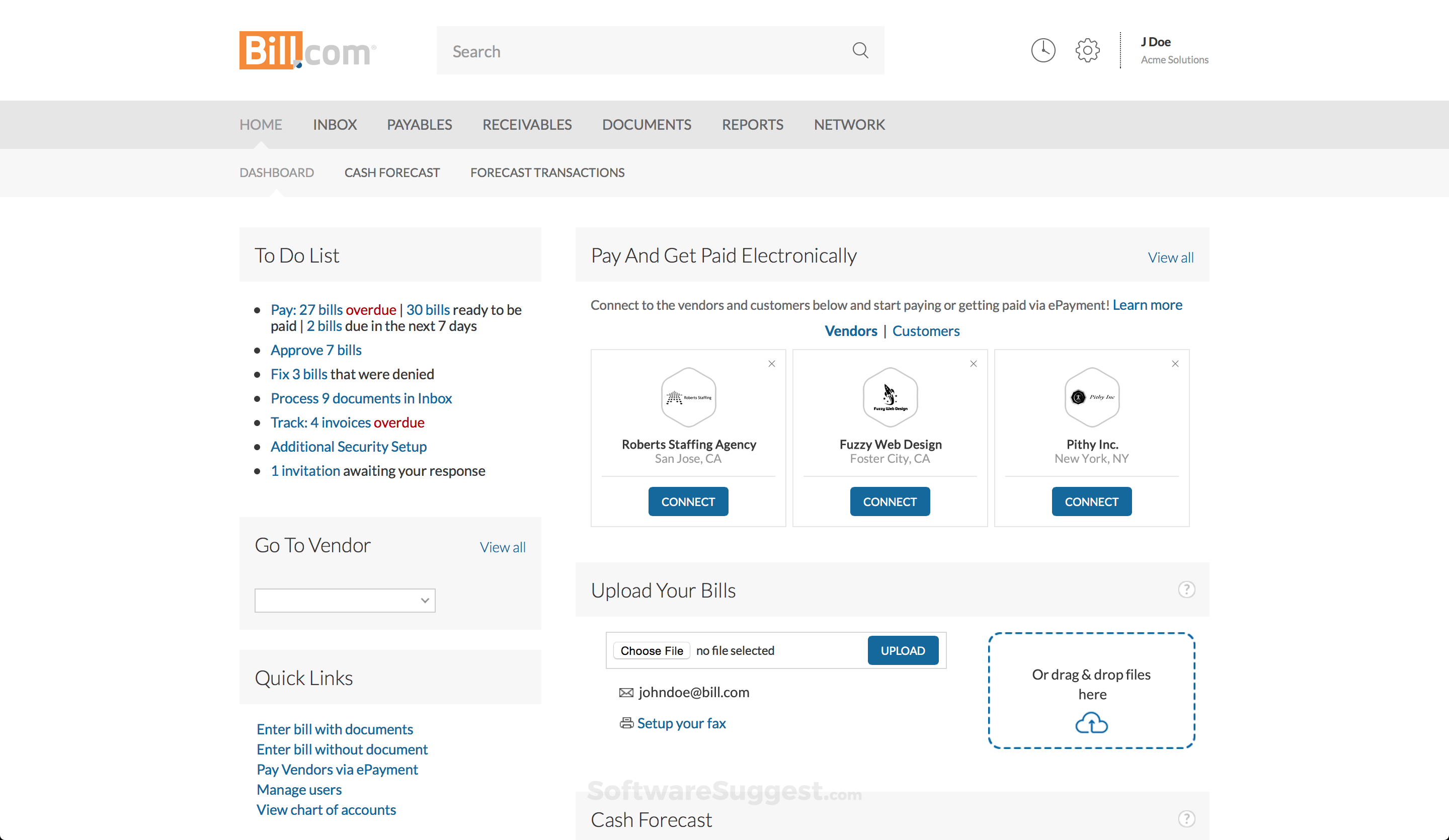
Bill.com, listed as BILL on the New York Stock Exchange, is a cloud-based financial operations platform designed to automate accounts payable, accounts receivable, and business payment processes. Founded in 2006 by Rene Lacerte in San Jose, California, the company has expanded into a publicly traded business with a market capitalization exceeding $6 billion, supporting more than 400,000 organizations. As a second-generation fintech founder whose father helped launch PayCycle (later acquired by Intuit), Lacerte built Bill.com on the observation that small and mid-sized businesses were still relying on outdated payment methods unchanged since the 1990s.Bill.com’s transformation into a comprehensive financial solution was significantly boosted by strategic acquisitions. In 2021, the company purchased Divvy, a corporate card and expense management platform, in a $2.5 billion deal. Later that same year, it acquired Invoice2go, a popular invoicing tool tailored for small businesses. These moves expanded Bill.com beyond a dedicated AP automation tool into a full-suite financial operations platform, now covering payables, receivables, corporate spending, and expense tracking in one unified system.
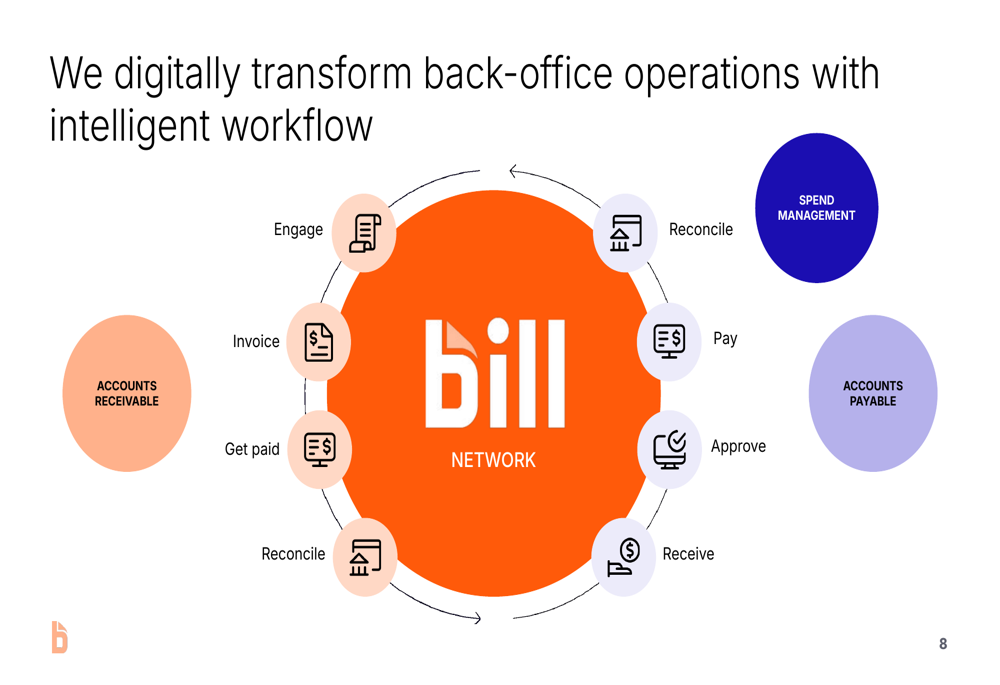
What sets Bill.com apart from standard accounting software is its sharp focus on payment workflows rather than just ledger management. While platforms like QuickBooks and Xero primarily track amounts owed and receivable, Bill.com automates the entire lifecycle of sending and receiving payments—including approval chains, payment execution, vendor communications, and reconciliation. It effectively acts as a bridge between incoming invoices in your inbox and final transaction recording in your accounting software, streamlining every step in between.The platform offers deep, native integrations with major accounting systems including QuickBooks Online, QuickBooks Desktop, Xero, Sage Intacct, Oracle NetSuite, and Microsoft Dynamics. Unlike basic CSV-based transfers, Bill.com enables bidirectional synchronization of charts of accounts, vendor profiles, customer records, and payment transactions. This setup maintains your existing accounting software as the single source of truth while letting Bill.com manage the day-to-day operational workflows seamlessly.
Bill.com Pricing & Plans: Not Cheap, But Justifiable
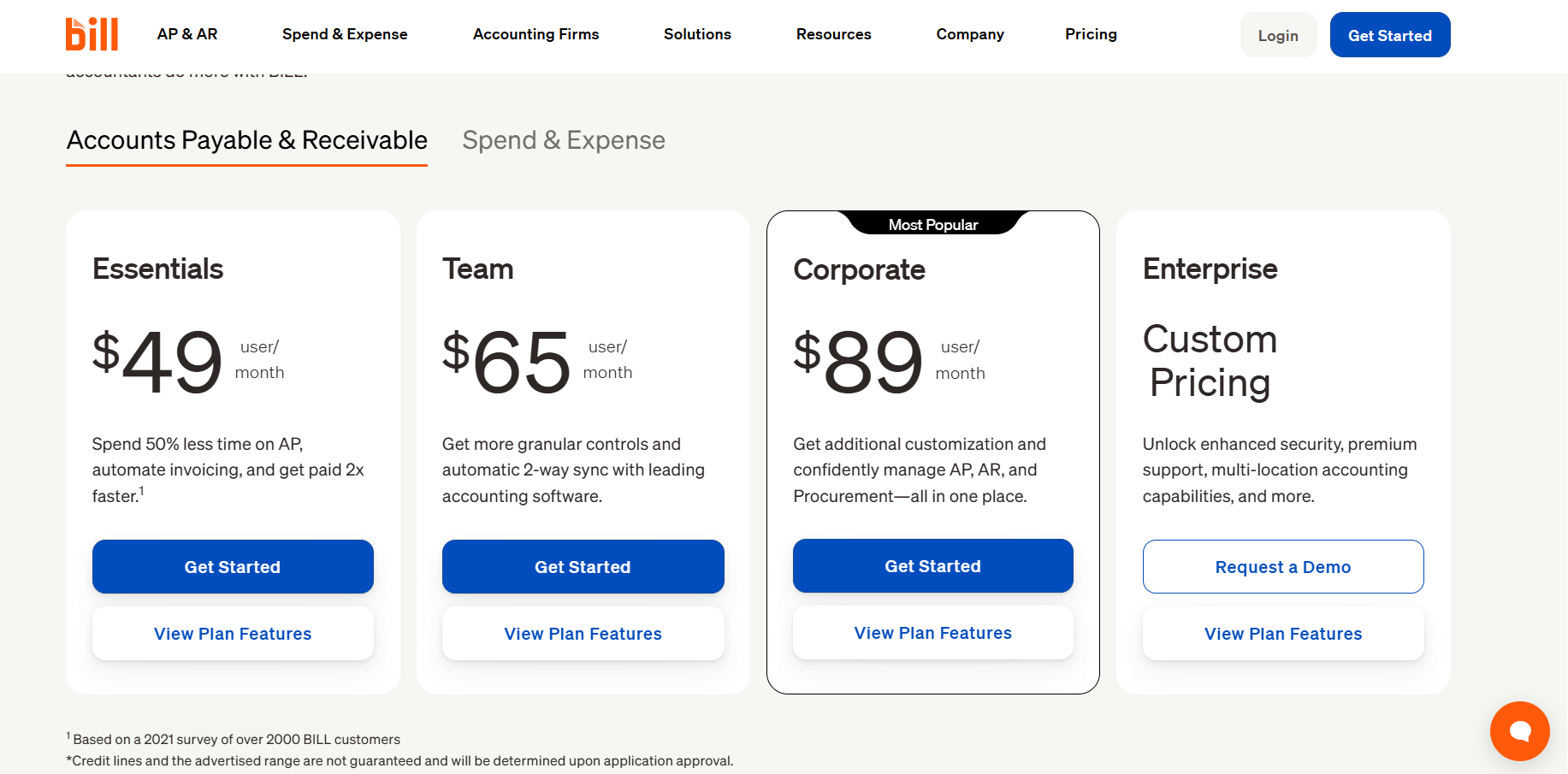
Bill.com’s pricing structure is simple in outline but can grow complicated once transaction fees are included. All plans are billed per user each month, and several payment methods come with additional per-transaction charges.
Essentials ($45/user/month) – Core AP or AR
The Essentials plan provides either accounts payable or accounts receivable automation, but not both simultaneously. For AP users, it includes AI-powered invoice capture, customizable approval workflows, payment processing via ACH, check, or virtual card, and integration with one accounting software platform. For AR users, it offers invoice creation, online payment acceptance, payment tracking, and accounting sync.A business user started with the Essentials plan in the first month to test core AP workflows, and the AI invoice capture performed notably well: dragging an invoice PDF into Bill.com allows the system to extract vendor name, invoice number, amount, due date, and line items within seconds. Initial accuracy reached around 85%, with manual corrections mostly needed for non-standard invoice formats or handwritten details.A practical limitation is that Essentials restricts users to either AP or AR rather than both, meaning most businesses needing full automation for both payables and receivables will need to upgrade to Team or higher. The single accounting software integration also means companies with multiple entities using different platforms must move to a higher tier.
Team ($55/user/month) – AP + AR Combined
The Team plan unlocks both AP and AR automation in one platform, adds custom user roles, and includes stronger approval policies. This was our main plan for the following five months. The unified AP/AR view greatly improved cash flow visibility, allowing the finance team to see incoming and outgoing funds aligned with payment terms, giving the controller a real-time cash position that previously required manual spreadsheet work every Friday. This tier works best for finance teams of 3–10 people managing both payables and receivables, with the $55 per user cost hitting a sweet spot for most mid-market businesses.
Corporate ($79/user/month) – Enterprise Controls
The Corporate plan adds advanced approval rules, custom integrations, priority support, and stronger audit controls. It also supports multiple entities and advanced reporting, making it the right choice for businesses with complex organizational structures or strict regulatory requirements.
Enterprise (Custom Pricing) – Full Platform
The Enterprise tier includes all Corporate features plus dedicated account management, custom onboarding, SLA guarantees, and full API access for building custom integrations. Pricing is individually negotiated based on transaction volume, number of users, and specific operational needs.
Transaction Fees
Transaction fees add significant nuance to Bill.com’s overall cost structure. Standard ACH payments are free, while next-day ACH costs $0.49 per transaction. Check payments cost $1.69 each, with Bill.com handling printing and mailing. International wires start at $0 for supported countries, with fees varying by region. Virtual card payments are free, as Bill.com earns revenue through interchange fees. Cross-border payments typically carry fees of 1–2%, depending on the country and currency. Divvy cards are available as add-ons for Essentials and Team plans but come included in Corporate and Enterprise. Priority support is only available for Corporate and Enterprise users, while API access is limited in the Corporate plan and fully available only at the Enterprise level.
Key Features Deep Dive

Accounts Payable Automation – The Core Engine
AP automation stands as Bill.com’s flagship function, delivering the platform’s greatest value by managing the full invoice lifecycle: receipt, data capture, coding, approval routing, payment execution, and reconciliation.
Invoices can be submitted via email, direct upload, mobile capture, or vendor portal, with AI processing documents in seconds to extract vendor details, invoice numbers, amounts, due dates, line items, and tax information. Over six months of use, extraction accuracy averaged 85% for standard invoices and around 70% for non-standard formats such as international or handwritten documents.
A major efficiency gain comes from automatic GL coding: the platform learns typical account assignments from past transactions, correctly pre-coding roughly 60% of invoices by the third month and eliminating most manual data entry. This feature alone saved significant weekly hours for AP staff.Bill.com’s approval routing far outperforms basic accounting tools, supporting customizable tiered workflows based on invoice value. Approvers receive email and mobile alerts, review invoice data and images, and approve or reject items with comments, while a full audit trail logs all actions with timestamps and user information.
Accounts Receivable – Getting Paid Faster
The AR module streamlines invoicing, customer delivery, payment acceptance, and balance tracking. While less robust than dedicated invoicing tools, it integrates seamlessly with AP management within a single platform.Invoicing is simple and direct, with customers accessing a branded page to pay via ACH, credit card, or wire. ACH is free for payers, while credit card transactions carry standard processing fees.
The dashboard tracks overdue invoices by aging periods, sends automated reminders, and provides real-time deposit alerts. These tools helped reduce average days sales outstanding notably within three months, driven by simplified online payments and automated follow-ups.
Approval Workflows – The Compliance Backbone
Approval workflows form a critical compliance layer, with far more advanced rules than standard accounting or payment software. Policies can be set based on amount, vendor type, GL account, department, location, or combined conditions, routing expenses to appropriate department leaders and enforcing strict review paths.Mobile approval functionality is particularly effective: approvers receive push notifications, view invoice details, and quickly approve or reject items. This flexibility drastically reduced average approval time across the organization, removing delays from busy decision-makers.
Payment Execution – Flexible and Controlled
Beyond tracking liabilities, Bill.com initiates actual payments by connecting directly to user bank accounts, supporting ACH, printed and mailed checks, wires, and virtual cards.Virtual cards generate single-use numbers for vendors, with Bill.com returning interchange revenue as cashback rebates. Over six months, these rewards offset a significant portion of subscription costs, providing tangible savings for compatible vendors.The platform also supports scheduled payment batches aligned with cash flow needs, allowing consistent, predictable payment runs and simplifying overall cash management.
Accounting Integrations – The Sync That Matters
Bill.com offers reliable bidirectional sync with major accounting platforms including QuickBooks Online, QuickBooks Desktop, Xero, Sage Intacct, Oracle NetSuite, and Microsoft Dynamics.After initial mapping of accounts, vendor and customer lists, and items, data syncs automatically between systems. Invoices and payments processed in Bill.com appear correctly in the connected accounting software, with seamless bank reconciliation.Only a small number of sync errors occurred over six months, nearly all from conflicting vendor records in accounting software. Each issue was clearly flagged and quickly resolved, demonstrating strong overall reliability.
Pros and Cons

Pros
– AI-Powered Invoice Capture Reduces Manual Work: The AI-driven invoice capture feature auto-extracts vendor details, invoice amounts, GL coding, and due dates within seconds, drastically cutting down manual data entry. This significantly reduces the workload of AP staff, shifting their focus from tedious data input to review and approval.
– Robust Approval Workflows Ensure Compliance: Multi-level, conditional approval routing with complete audit trails replaces disorganized email-based approvals. Every invoice has a documented approval chain, which is critical for audits, regulatory compliance, and internal financial controls.
– Flexible Payment Options Optimize Cash Management: Bill.com offers a single platform for ACH, checks, wires, and virtual cards, with scheduled batch payments to align disbursements with cash flow needs. Virtual card rebates also provide tangible cashback, offsetting part of subscription costs.
– Best-in-Class Accounting Integrations: Bidirectional sync with major accounting software (QuickBooks, Xero, NetSuite) is reliable and seamless. Transactions flow smoothly between systems, eliminating double-entry issues and simplifying reconciliation.
– Centralized Vendor Management: All vendor information, payment history, W-9s, and communication are stored in one central repository, streamlining tax season preparation and vendor relationship management.
Cons
– High Pricing for Larger Teams: Subscription costs range from $45 to $79 per user per month, plus additional transaction fees. For larger finance teams, these costs add up quickly, making it more expensive than alternatives with free AP or pay-per-transaction models (e.g., Melio).
– Expensive International Payments: Cross-border payment fees of 1–2% make Bill.com uncompetitive for businesses with heavy international payables. Specialized platforms like Wise Business or Tipalti offer more cost-effective multi-currency payment solutions.
– Steeper Than Advertised Learning Curve: Despite marketing claims of quick setup, configuring approval policies, accounting sync, and payment workflows requires significant time and effort. Implementation typically takes weeks, not the “one day” promised in marketing materials.
Setup & Implementation
The Real Timeline
– Week 1: Foundation (8-12 hours): Connect accounting software and verify sync (chart of accounts, vendor/customer lists), link bank accounts for payments, import vendor W-9s and payment preferences, and invite admin users with basic roles.
– Week 2: Approval Workflows (6-8 hours): Design and implement approval policies (approver roles, amount thresholds, routing order), test with sample invoices, and train approvers on mobile/email approval.
– Week 3: Team Training and Parallel Run (10-15 hours): Run Bill.com alongside existing AP processes for one payment cycle to verify accuracy, and train team members on their respective workflows (invoice intake, approval, payment execution, reconciliation).
– Week 4: Go Live and Optimization: Switch to Bill.com as the primary AP workflow, monitor sync accuracy and approval/payment efficiency, adjust policies based on usage, and set up AR if needed.
Best Use Cases & Industries
Mid-Market Finance Teams (50-500 Employees) – Perfect Fit
Bill.com’s sweet spot lies with companies that have dedicated AP staff but do not yet require enterprise-level AP platforms integrated with ERP systems. Finance teams processing 100-500 invoices per month and needing multi-level approval workflows derive the greatest value from the platform.
Accounting Firms Managing Client AP – Excellent Fit
Bill.com’s accountant portal enables firms to manage AP for multiple clients from a single dashboard. With over 6,000 accounting firms using Bill.com for client AP services, it has become the de facto standard for outsourced AP in the small business accounting sector.
Multi-Entity Businesses – Good Fit (Corporate+)
Companies with multiple legal entities that require separate AP workflows but centralized oversight benefit from Bill.com’s multi-entity support, available on Corporate and Enterprise plans. Consolidated reporting across entities provides CFO-level visibility into financial operations.
Startups Under 20 Employees – Questionable Fit
Early-stage companies with low invoice volumes may find more cost-effective alternatives like Melio (free) or Ramp (free with card). Bill.com’s per-user pricing only makes economic sense when AP volume justifies the investment in automation.
Security & Compliance

Bill.com holds a full suite of key compliance certifications, including SOC 1 Type II, SOC 2 Type II, PCI DSS (Level 1), GDPR, bank-level encryption (AES-256), and NACHA compliance.Bill.com’s security framework aligns with its core function of processing financial transactions. As a dedicated payments platform, it adheres to stringent bank-grade security standards, and its compliance certifications clearly demonstrate this commitment. SOC 1 and SOC 2 Type II audits evaluate both financial reporting controls and data security safeguards—essential features for a platform that integrates directly with user bank accounts and manages payment processing on their behalf.
Data protection is enforced across both data in transit (TLS 1.2 or higher) and data at rest (AES-256 encryption). Multi-factor authentication is available to all users and required for administrative accounts. Role-based access control policies restrict permissions for creating invoices, approving payments, initiating disbursements, and viewing financial reports, establishing clear separation of duties that meets auditor requirements. Payment initiation also includes bank-level verification steps such as micro-deposit confirmation.
A notable strength is the comprehensiveness of its audit logging. Every activity—including invoice creation, edits, approvals, rejections, and payment processing—is recorded with timestamps, user identifiers, and IP addresses. During our annual year-end audit, our external auditor specifically praised the quality and structure of Bill.com’s audit documentation, especially when compared to our prior manual workflow using email and spreadsheets.
Bill.com Customer Support

Our six-month assessment of Bill.com’s customer support revealed a mixed performance, with strengths in self-service resources and phone support offset by slow email responses and limited chat capabilities.
The platform’s knowledge base stands out as a comprehensive resource, featuring detailed articles that address common workflows, troubleshooting for accounting integrations, and inquiries about payment statuses. Additionally, video walkthroughs effectively guide users through setup and configuration processes, reducing the need for direct support in routine tasks.
However, email support fell short of expectations, with average response times ranging from 18 to 24 hours—unacceptably slow for a financial platform. When critical issues arise, such as stuck payments or sync errors, waiting an entire business day for a response creates unnecessary anxiety and disruption. For instance, our most urgent ticket—concerning a payment that appeared to fail but might still have been processing—took 22 hours to receive an initial response. During that period, we faced uncertainty about whether our vendor would receive timely payment, a flaw that undermines trust in the platform for core financial operations.
In contrast, phone support—available exclusively for Corporate and Enterprise tiers—delivered strong results. Hold times averaged 8 to 12 minutes, and agents demonstrated deep expertise in the platform. When I inquired about configuring a complex approval policy, the agent clearly walked me through the underlying logic and even suggested an alternative approach I had not considered. This high-quality phone support partially justifies the upgrade to the Corporate tier for organizations that regularly process time-sensitive payments.Chat support was responsive during business hours, with wait times of 2 to 5 minutes, but it was limited to basic inquiries. Complex questions were consistently escalated to email, reintroducing the 18-24 hour delay and negating the efficiency of chat for non-routine issues.
Bill.com Performance & Reliability Assessment

Bill.com delivers solid performance across its core workflows, ensuring efficiency for day-to-day financial operations. For standard PDF invoices, uploads and AI-driven processing are completed in just 5 to 10 seconds, minimizing wait times for users. Approval notifications—sent via both email and push alerts—arrive promptly, within 1 to 2 minutes of invoice submission, keeping stakeholders informed and workflows on track. Payment execution also adheres to expected timelines: standard ACH payments post within 1 to 3 business days, while expedited options process the next business day, meeting most organizations’ payment needs.The platform’s accounting sync functionality operates on a configurable schedule, allowing users to set intervals ranging from every few hours to once daily. During our testing, QuickBooks Online syncs were completed within 15 minutes, with new transactions mapped accurately and without discrepancies. We initially configured hourly syncs during our parallel-run phase to ensure data consistency, then adjusted to a 4-hour interval once we verified the sync’s reliability.
Over our six-month evaluation period, we encountered only one platform outage—a 3-hour delay in the payment execution queue. Notably, Bill.com demonstrated strong communication during this incident, providing proactive updates via email and its status page. Once the issue was resolved, all queued payments were processed successfully, with no payments lost or duplicated. The company maintains a public status page, which shows historical uptime consistently above 99.9%, reflecting a reliable infrastructure overallThe Bill.com mobile app (available for iOS and Android) performs effectively for its primary purpose: on-the-go invoice approvals. Loading invoices with attached images takes 3 to 5 seconds on cellular connections, and the approval workflow—including reviewing details and selecting approve or reject—is quick and intuitive. However, more complex tasks, such as creating payment batches and generating detailed reports, are better suited for the desktop interface, as the mobile app’s functionality is streamlined for simpler, on-the-fly actions.
Conclusion

In conclusion, Bill.com demonstrates strong overall performance and reliability that aligns with the needs of organizations managing routine financial operations. Its core workflows—from invoice processing and approval notifications to payment execution and accounting sync—operate efficiently, with clear and consistent timelines that minimize disruptions. The platform’s high historical uptime (consistently above 99.9%) and proactive communication during the single minor outage further reinforce its reliability, while the accurate accounting sync and intuitive mobile app for on-the-go approvals add practical value for day-to-day use.
That said, there are minor areas where Bill.com could improve to elevate its performance even further. While the mobile app excels at basic approvals, enhancing its functionality for more complex tasks would make it a more versatile tool for users needing full access on the go. Additionally, while the single outage was handled effectively, maintaining zero downtime remains an ideal goal for a platform supporting critical financial transactions. Overall, Bill.com’s performance and reliability make it a trustworthy choice for organizations seeking a streamlined, efficient payment and invoice management solution.